Unlocking Your AI: An Introduction to the Model-Context Protocol (MCP)
We’ve previously discussed the fundamental differences between MCP, ACP, and A2A, which you can review for more background. Today, we’re going to take a more detailed look into MCP.
Large Language Models (LLMs) like Gemini, Claude, and ChatGPT are incredibly powerful, but they have a fundamental limitation: they live in a digital sandbox, isolated from your personal computer and its unique tools. They can’t read your local files, run a script you just wrote, or access your company’s internal database.
But what if they could? What if you could give your AI a safe and secure “key” to your local environment? This is the problem that the Model-Context Protocol (MCP) is designed to solve.
What is MCP?
At its core, MCP is a standardized language—a universal bridge—that allows an AI model to communicate and interact with local applications, tools, and files. It acts as a secure intermediary, enabling your LLM (the “brain”) to safely use the resources on your computer (the “hands”).
Think of MCP as a universal adapter for your AI. 🔌 Without it, your AI is like a phone with a unique plug that doesn’t fit any outlets. With MCP, your AI can connect to any tool or data source, unlocking its true potential to act as a personalized and powerful assistant.
How It Works: The Client-Server Architecture
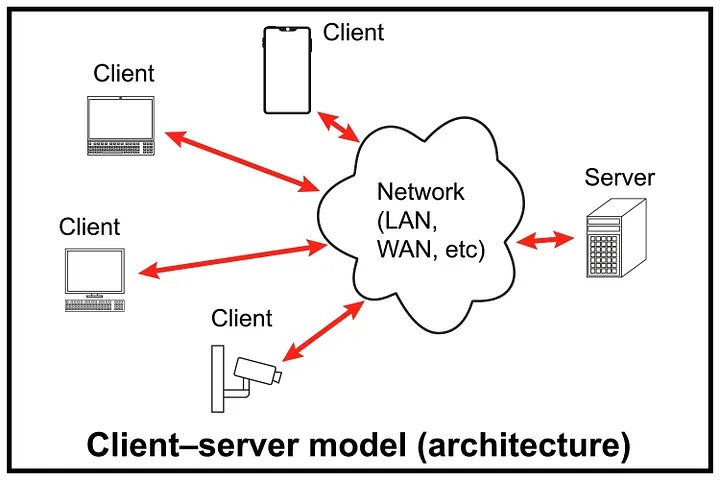
MCP operates on a simple and robust client-server model. This separates the “thinking” part from the “doing” part, which is crucial for security and organization.
- MCP Client (The “Host”): This is the application where the LLM resides. In our project, our
mcp_chatbot.pyscript acts as the client. It takes a user's query, consults the LLM, and when the LLM decides to use a tool, the client sends a request to the server. - MCP Server (The “Toolbox”): This is a separate application that holds all the capabilities you want to expose to the LLM. Our
research_server.pyis a perfect example. It doesn't contain the AI model itself; it just contains the tools and resources that the AI is allowed to use.
These two components talk to each other using the Model-Context Protocol, ensuring that requests and responses are understood correctly and securely.
Building an MCP Server in Python
Creating an MCP server in Python is surprisingly straightforward, thanks to a few simple decorators that turn your regular functions into AI-accessible capabilities.
@mcp.tool(): This is the most common and powerful decorator. It instantly turns any Python function into a tool that the LLM can call. MCP automatically inspects your function's signature and docstrings to create a schema—a detailed description—that tells the LLM what the tool does, what arguments it needs (e.g.,paper_id: str), and what kind of information it returns. It’s like creating an instant user manual for your functions that the AI can read and understand.@mcp.resource(): While a tool is for doing something, a resource is for knowing something. This decorator is used to expose data or files to the LLM. You could use it to let the AI read a specific document, a CSV file, or a record from a database to give it context for its tasks. It's like putting a specific book from your library on the table for the LLM to read.@mcp.prompt(): This decorator is used to provide the LLM with predefined instructions or templates. A prompt can be a set of rules, a personality to adopt, or a complex template for generating specific kinds of text. It’s a way to guide and constrain the LLM's behavior to ensure its output is consistent and useful for your application.
The Handshake and the Conversation: The MCP Protocol
The communication between the client and server follows a clear lifecycle and can happen over different connection types, making it highly flexible.
Lifecycle
- Initialization: This is the “handshake.” The client connects to the server, and the server responds with a list of all its available tools, resources, and prompts. This is how the client’s LLM knows what it’s capable of doing.
- Message Exchange: This is the main “conversation.” The client sends requests to the server, such as “run the
extract_infotool withpaper_id='12345'," and the server executes the function and sends the result back. - Termination: The “goodbye.” The client or server closes the connection when the session is over.
Connection Types
MCP supports various connection methods (or “transports”) depending on your needs:
stdio: The simplest method, perfect for local development. The client literally starts the server as a background process and communicates with it through its standard command-line input and output. This is the method we used in our project.http+sse: A modern web-based method using HTTP and Server-Sent Events (SSE). SSE is great for streaming data, making it ideal for web applications where the AI might send back a long, streaming response.http: The standard request-response protocol of the web. It's reliable and universally understood, suitable for a wide range of network-based applications.
What’s Next?
We’ve now covered the “what” and “how” of the Model-Context Protocol—from its core purpose to the specific decorators and protocols that make it work. You should have a solid understanding of how MCP bridges the gap between powerful AI models and your local code.
In our next session, we’ll move from theory to practice and explore some powerful, real-world use cases for MCP. We’ll build on the research assistant we’ve created to show how you can build truly intelligent and useful local AI agents.
References
This article is based on concepts and examples from the following DeepLearning.AI course:
- Course: Claude Code: A Highly Agentic Coding Assistant
- Provider: DeepLearning.AI
Comments
Loading comments…
Leave a Comment