Using Tools to Build a Chatbot: A Practical Example in a Jupyter Notebook
Following the previous article on the concept of MCP, this time we will
get hands-on and build a chatbot prototype directly in a Jupyter
Notebook environment. This example will demonstrate how to empower a
language model to handle more complex queries by defining and executing
tools directly, without relying on an external framework. The entire
example covers the definition and execution of tools, as well as the
construction of the chatbot's core code.
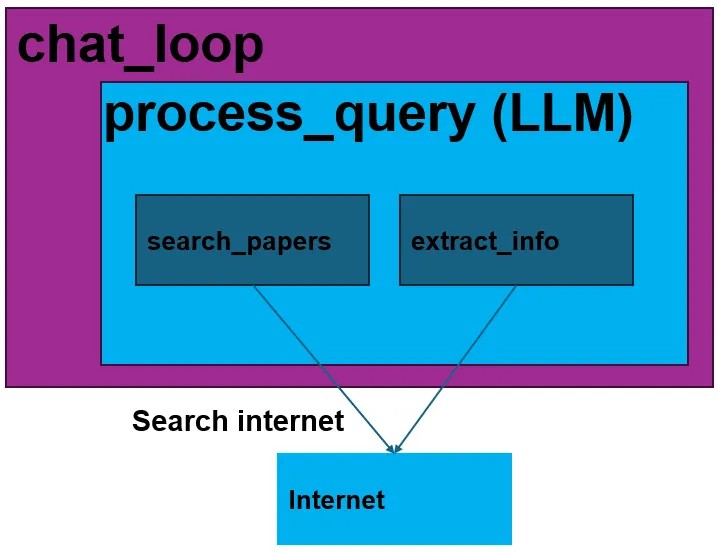
Basic flow
Two Powerful Core Tools
This chatbot relies on two core tools to perform its tasks:
search_papers: - Function: This tool searches for relevant
papers on the arXiv platform based on a given topic and stores their
information (including title, authors, summary, paper URL, and
publication date) into a JSON file. - Special Note: These JSON files
are organized by topic in the papers directory, but the tool itself does
not download the papers. - Parameters: topic (the topic to search
for) and max_results (the maximum number of papers to retrieve,
defaulting to 5).
extract_info: - Function: This tool looks for detailed
information about a specific paper across all topic directories within
the papers folder. - Parameters: paper_id (the ID of the paper to
look up). - Return Value: If the paper is found, it returns a JSON
string with the paper's information; otherwise, it returns an error
message.
The Communication Bridge between Tools and the Language Model
To enable the language model to use these tools, we need to define a
tool "schema" and establish an execution mechanism.
- Tool Schema: In the tools JSON object, we define the name, a
description of the function, and the required parameters for each
available tool. The language model refers to this schema to
determine when and how to call a tool to fulfill a user's request. - Tool Mapping and Execution: The
execute_toolfunction plays a
crucial role. It connects the tool name decided by the language
model to its corresponding Python function (search_papersor
extract_info) and executes it. Additionally, it formats the tool's
execution results so the language model can easily understand them
and use them to generate the final response.
The Chatbot's Logic
This chatbot operates in a simple yet effective manner. It processes
user queries one by one but does not persist memory across different
queries.
- process_query: This is the core function for handling a single
query. It sends the user's question to the language model and then
enters a loop. If the language model decides to call a tool,
process_querywill execute it and return the result to the model,
allowing it to continue the conversation based on the new
information until a final natural language response is produced. - chat_loop: This function provides an interactive interface,
allowing users to continuously input queries until they typequit
to exit.
Try it Out
You are free to interact with this chatbot. For example, you can enter
the following query to test it:
Search for 2 papers on “LLM interpretability”
To access the papers folder and view the saved paper files, go to the
Jupyter Notebook and click on: File → Open → L3
Comments
Loading comments…
Leave a Comment